


Blog
10 Ways My Agency Uses Connected Data to Create Better Results for My Clients
Most agencies promise results. Not many can show you where those results come from.
At Site Assembly, we got tired of pulling one number from Google Analytics, a different number from an email report, and a third number from a spreadsheet nobody trusted — and then presenting all three to a client like that made sense. It doesn’t. So we changed how we work. Here’s what that actually looks like, step by step.
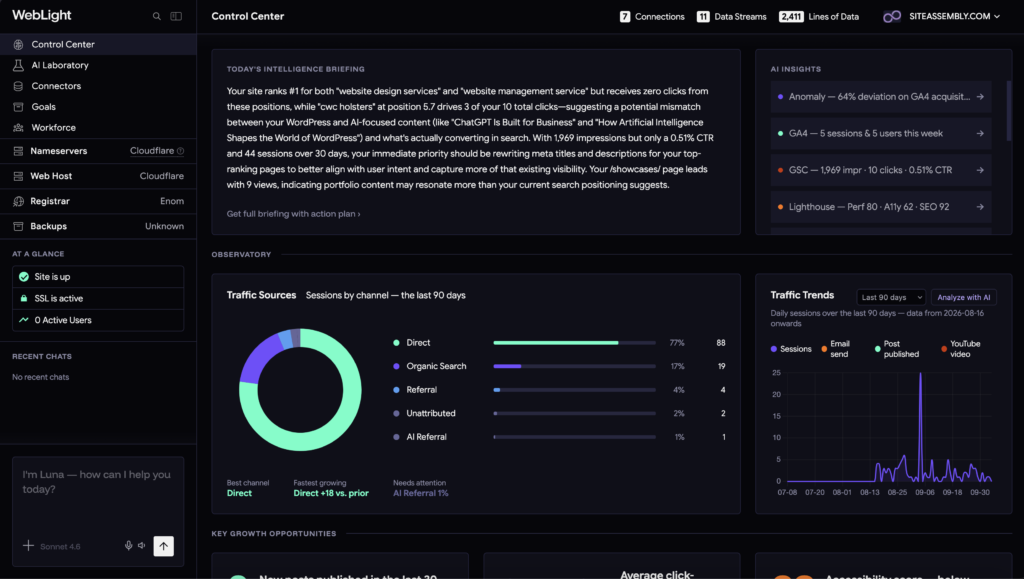
A quick note on how this fits together: WebLight’s Control Center is where we actually live day to day — it’s the single home base for a client’s connected data, whether that’s their website, their ad accounts, their payment processor, or their team’s Slack channel. Inside it, Luna (WebLight’s built-in AI strategist) helps us interpret what that data is actually saying, instead of us staring at charts guessing. The AI Laboratory is where we test new page copy, funnel ideas, and content concepts before anything goes live on a client site. And Goal Automations handle the repetitive follow-through — alerts, reporting, nudges — so nothing falls through the cracks between strategy sessions. Here’s how all of that plays out in practice.
1. We connect everything into one place — and “everything” means more than analytics
Before we write a word of copy or plan a campaign, we connect the client’s tools into WebLight‘s Control Center. For most clients that starts with the obvious stuff — WordPress, Google Analytics 4, Google Search Console — but it doesn’t stop there.
How we actually do it: Depending on what a client actually runs, we’ll connect their content calendar in Planable, their ad spend in Meta Ads, their revenue in Stripe, their email list in Kit or their publication in Ghost, session behavior in Microsoft Clarity, booked calls in Calendly, infrastructure in AWS, and team alerts in Slack. The point isn’t to connect everything for the sake of it — it’s that a client’s actual business doesn’t live in one tool, so their data shouldn’t either. If a client’s funnel includes a Calendly booking after an ad click that was paid for in Meta Ads and ends in a Stripe transaction, we want to see that whole path, not three disconnected fragments of it.
2. We harmonize the data so our reports actually agree with each other
This is the unglamorous part. But it’s the part that matters most. If your GA4 pageviews and your Search Console clicks tell two different stories, you don’t have a reporting problem — you have a trust problem. Visible Light wrote more about why that happens in Why Your Marketing Data Doesn’t Match (And How to Fix It).
How we actually do it: Instead of exporting a CSV from each tool and manually reconciling numbers in a spreadsheet (we did this for years — don’t), WebLight pulls every connected source into a shared data warehouse behind the scenes (built on BigQuery) and lines everything up against the same timeframe before it ever reaches our screen. We don’t need to understand the plumbing — we just need the numbers to agree, and they do. When a client asks “how many people visited the blog last month,” we have one answer, not three. More on this approach in Marketing Data Integration: A Practical Starting Point.
3. We visualize harmonized data in a way a client can actually read
A dashboard full of separate charts from separate tools is still six things to interpret. We’d rather hand a client one.
How we actually do it: The Control Center takes data from multiple connected sources — say, site traffic from GA4, ad spend from Meta Ads, and revenue from Stripe — and renders it on the same graph, same timeline. That means a client can see the week their ad spend went up and watch, on the same chart, whether traffic and revenue actually moved with it. That’s a very different conversation than handing someone three separate screenshots and asking them to mentally overlay the dates themselves.
4. We decide what to rebuild based on where the data points, not instinct
Agencies used to pitch website rebuilds on a feeling — “it looks dated” — and clients learned to distrust that pitch, fairly. We don’t start there anymore.
How we actually do it: Before we recommend a rebuild, a redesign, or even a single new landing page, we look at what the Control Center is actually showing: which pages get traffic but don’t convert, which ones rank in search but lose the visitor immediately, which ones barely get found at all. If a client has Microsoft Clarity connected, we’ll also look at session behavior — where people are actually clicking or getting stuck — before touching the layout. Luna helps us separate “this page needs a rewrite” from “this page needs to not exist.” That distinction changes the whole scope of a project — and it means when we tell a client why we’re rebuilding something, we can point at the exact evidence instead of an opinion.
5. We benchmark against real competitors, not guesses about them
Every client wants to know how they stack up. “Better than last quarter” is a fine answer. “Better than the three businesses actually competing for the same customer” is a much more useful one.
How we actually do it: WebLight’s Competitor Analysis tracks a client’s top three competitors on health score, Lighthouse performance, accessibility, SEO, and best-practices scores — plus the actual keywords and phrases those competitors emphasize on their own site. On a recent audit for this very site, our top-tracked competitor scored a 99 health score with a perfect 100 on accessibility and SEO, against a site Lighthouse score for siteassembly.com of 80 performance, 62 accessibility, and 92 SEO at the time. That accessibility gap wasn’t a guess — it was sitting right there in the Control Center, which is exactly why it became a fix on our own list. That’s the value of competitor tracking: it turns “we should probably improve X” into “here’s the specific number we’re behind on, and here’s who’s ahead of us.”
6. We prototype new page copy and funnels before they ever touch the live site
Generic AI writing tools guess, and generic funnel ideas get built on hope. We don’t want either on a client’s live site.
How we actually do it: We use the AI Laboratory to draft and test new marketing page copy, funnel sequences, and content angles in a sandbox — connected to what we already know about the client’s audience from their search and analytics data — before anything goes near production. A first draft of new homepage copy, a reworked checkout flow, a new lead-gen funnel: it all gets shaped here first. Our humans can edit and enhance it if needed, but Training Nodes and Connected Data allow AI responses in WebLight to sound like the client, not like a robot. The Lab does the heavy lifting on structure, research, voice and judgment. Humans add the final touches, sign-off, and hand-off when approved.
7. We write SEO-optimized sales copy that doesn’t read like SEO copy
Nobody wants to read copy that was obviously written for a crawler. So we split the job in two, right inside the Lab.
How we actually do it: The technical side — meta titles, meta descriptions, the stuff search engines actually parse — gets generated and refined in the AI Laboratory. That frees up the actual page copy to focus entirely on the human reading it. We generate a few meta description options per page, pick the one that reads most naturally out loud, and move on. Search engines and people can both be happy. That’s the goal — and it’s a lot faster than writing meta tags by hand for every single page on a client site.
8. We track search performance in the same place we publish, and let it guide conversion fixes
Search Console tells you what’s working. WordPress is where you fix it. Keeping those separate means you’re always a step behind — and it means your conversion optimization is disconnected from your SEO strategy, when really they should inform each other.
How we actually do it: Inside the Control Center, we check which search queries are already driving impressions and clicks for a client’s site, then look at the actual published content and its conversion behavior next to that data — same screen, no tab-switching. If a query is getting impressions but the matching page isn’t converting, that’s our signal to fix the page’s offer or layout, not write a new one. We’d rather repair an existing high-intent page than add another one to the pile.
9. We check site health before it becomes a client complaint
Page speed. Accessibility. Technical SEO basics. Nobody wants to hear “the site feels slow” from the person paying the invoice — and a slow or inaccessible page quietly kills conversion rate before copy ever gets a chance to work.
How we actually do it: We run performance checks through the Lighthouse audits connected in the Control Center — covering performance, accessibility, SEO, and best practices — on a regular cadence, not just when something breaks. If a score drops after a new plugin or a big content push, we catch it in the audit before the client notices the site lagging, and before it shows up as a dip in conversions we’d otherwise have to go hunting for.
10. We automate reporting and follow-through instead of rebuilding it every month
Pulling a monthly report shouldn’t take a full day of copy-pasting, and good ideas shouldn’t die because nobody remembered to act on them.
How we actually do it: We built our reporting around the Control Center’s marketing dashboard, which pulls from analytics, search data, ad spend, revenue, and content performance in one view — and surfaces notable changes automatically, instead of making us dig for them. On top of that, Goal Automations handle the follow-through: flagging when a page’s performance crosses a threshold, queuing up a reporting summary, dropping an alert in a client’s Slack channel, or prompting us to revisit a funnel step that’s underperforming. Luna helps translate those flags into plain next steps instead of just raw numbers. Visible Light wrote more about connecting the dots between content and outcomes in Content ROI: How to Connect Content to Revenue. Short version: if you can’t trace content to results, you’re reporting activity, not results.
11. We treat every client’s data like it’s theirs — because it is
This one’s not a feature. It’s a principle.
How we actually do it: We don’t lock clients into a black box, and neither does WebLight. Every connected source — whether it’s WordPress, GA4, GSC, Stripe, or anything else a client runs their business on — stays visible and exportable, because the data belongs to the client, not to us. If a client ever leaves, they leave with their numbers intact and understood, not stranded in a dashboard they can’t access. If you want the deeper version of this idea, Visible Light’s Customer Intelligence for Teams Without a Data Department and Self-Service Analytics: Get Answers Without a Data Team both dig into why this matters more for small teams than big ones. Enterprises can throw headcount at messy data


Go back to Blog